
 English
 中文
 Melayu
USDT Withdrawal Terms and Rules – VWORLD2 Download
USDT Withdrawal Overview for VWORLD2 Download Users
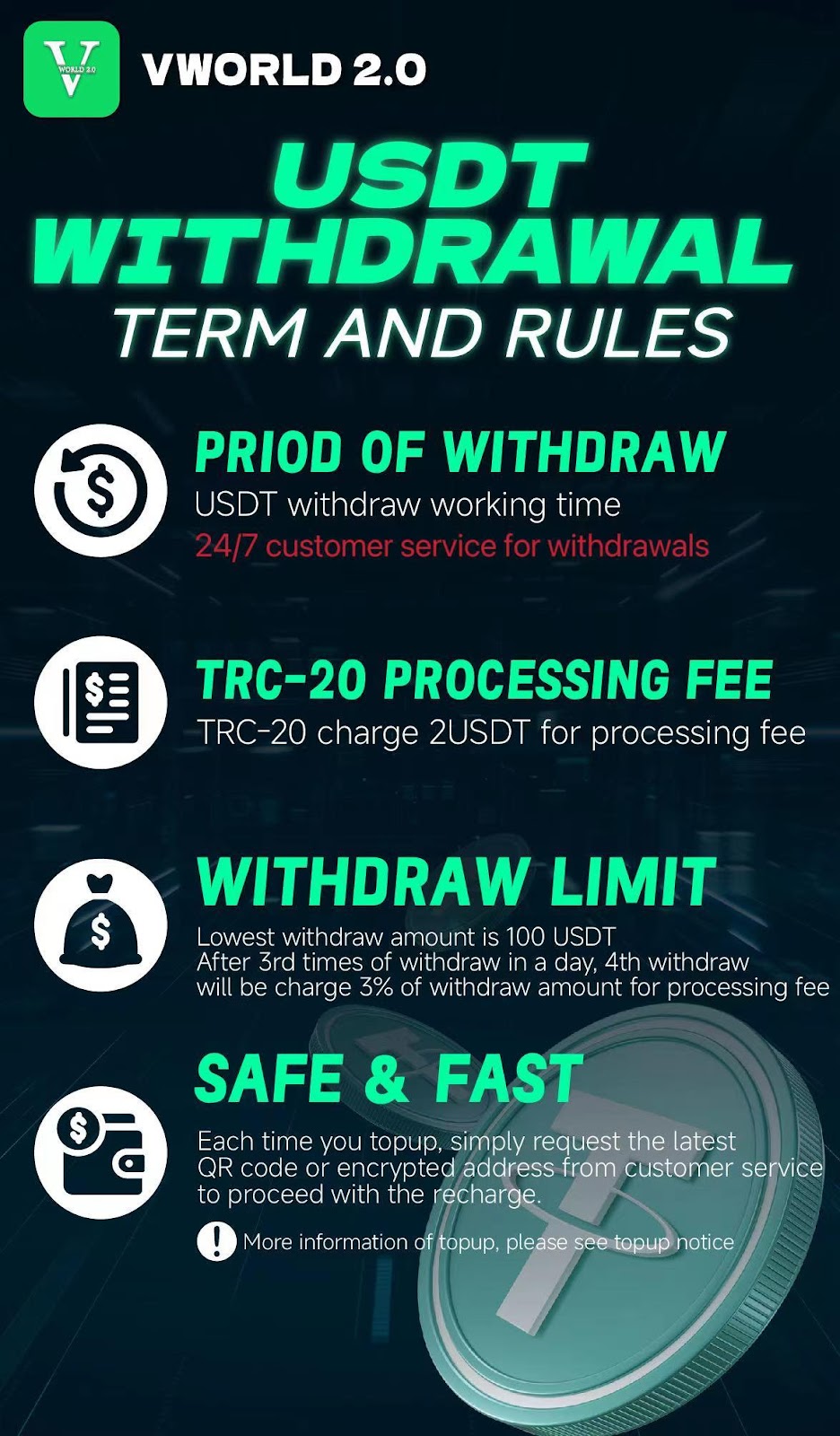
VWORLD2 Download now supports USDT (Tether) withdrawals, providing players with a fast, secure, and modern way to cash out their winnings. USDT withdrawals operate on the TRC-20 network, offering low fees and quick transaction times. This page outlines all terms, rules, fees, and procedures for withdrawing USDT from your VWORLD2 account. Understanding these guidelines ensures smooth and hassle-free withdrawals every time.
What is USDT Withdrawal on VWORLD2 Download?
USDT withdrawal on VWORLD2 Download allows players to convert their game credits into Tether (USDT) cryptocurrency and transfer them to an external USDT wallet. Using the TRC-20 network, these transactions are processed quickly and securely. USDT is a stablecoin pegged to the US Dollar, meaning 1 USDT equals approximately 1 USD, providing stability compared to other cryptocurrencies.
Period of Withdraw – 24/7 USDT Withdrawal Service
24/7 Customer Service for Withdrawals
VWORLD2 Download offers round-the-clock customer service support for USDT withdrawals. Whether you need to request a withdrawal, check transaction status, or resolve any issues, our customer service team is available 24 hours a day, 7 days a week. This ensures that players can access their funds whenever they need, without being limited by business hours or banking schedules.
How to Request USDT Withdrawal
To request a USDT withdrawal on VWORLD2 Download, contact customer service via Live Chat. A representative will guide you through the process and provide the necessary information. The 24/7 availability means you can withdraw at any time that suits you, including nights, weekends, and public holidays.
USDT Withdrawal Fees – TRC-20 Processing Fee
TRC-20 Processing Fee: 2 USDT
All USDT withdrawals on VWORLD2 Download using the TRC-20 network are subject to a fixed processing fee of 2 USDT per transaction. This fee covers the network costs associated with processing the transaction on the TRC-20 blockchain. The 2 USDT fee is deducted from your withdrawal amount before the funds are sent to your external wallet.
Why TRC-20 Network?
VWORLD2 Download uses the TRC-20 network for USDT transactions because it offers low fees, fast processing times, and widespread compatibility with major cryptocurrency wallets. TRC-20 transactions typically confirm within minutes, allowing you to receive your funds quickly compared to other networks.
Additional Fee for Multiple Withdrawals
VWORLD2 Download allows up to 3 withdrawals per day without any additional fees beyond the standard 2 USDT processing fee. However, if you make a 4th withdrawal in a single day, a 3% processing fee will be charged on the withdrawal amount. This fee is designed to encourage consolidated withdrawals and manage network processing loads. For example, if you withdraw 1000 USDT as a 4th daily withdrawal, a 30 USDT fee (3%) will apply plus the standard 2 USDT TRC-20 fee.
USDT Withdrawal Limits on VWORLD2 Download
Minimum Withdrawal Amount: 100 USDT
The minimum amount you can withdraw in USDT from VWORLD2 Download is 100 USDT. This minimum ensures that transaction fees remain proportionate and that withdrawals are processed efficiently. If your available balance is less than 100 USDT, you will need to continue playing or combine with additional funds to reach the minimum withdrawal threshold.
Maximum Withdrawal Amount
While the minimum withdrawal is 100 USDT, players should check with customer service for any maximum withdrawal limits that may apply based on account status, verification level, or other factors. Standard accounts typically have generous withdrawal limits, but high-value withdrawals may require additional verification for security purposes.
Safe & Fast USDT Withdrawal Process
Request Latest QR Code or Encrypted Address
For security reasons, VWORLD2 Download requires that each time you make a USDT withdrawal, you request the latest QR code or encrypted wallet address from customer service. This ensures you are using the most up-to-date and secure address for your transaction. Never use previously saved QR codes or addresses without confirming they are still valid.
Why Request Fresh Addresses?
Cryptocurrency security best practices recommend using fresh addresses for each transaction to prevent address reuse attacks and ensure maximum security. By requesting a new QR code or encrypted address for every USDT withdrawal on VWORLD2 Download, you protect your funds and ensure they go to the correct destination. This policy also helps prevent losses from outdated or compromised addresses.
Transaction Processing Time
USDT withdrawals on VWORLD2 Download typically take 15-20 minutes to process after confirmation. This includes the time for the platform to process your request and for the TRC-20 network to confirm the transaction. In some cases, network congestion may cause slight delays, but most transactions complete within this timeframe.
Automatic Credit After Transaction
Once your USDT withdrawal transaction is completed on the blockchain, the funds will be automatically deducted from your VWORLD2 account balance. You can verify the transaction status on the blockchain explorer using the transaction ID provided. If you have any questions about a completed withdrawal, contact customer service for assistance.
Important USDT Top-Up Information
Minimum and Maximum Deposit Limits
For USDT deposits (top-ups) on VWORLD2 Download, the following limits apply:
• Minimum Deposit: 50 USDT
• Maximum Deposit: 30,000 USDT
These limits ensure that deposits are processed efficiently and securely. If you wish to deposit amounts outside these limits, contact customer service to discuss options.
Request Fresh QR Code for Every Top-Up
Just as with withdrawals, for every USDT top-up, you must request the latest QR code or encrypted wallet address from customer service. Using old QR codes or addresses for deposits may result in lost funds, and the platform cannot be held responsible for such losses. Always verify you have the most current address before sending any cryptocurrency.
Deposit Processing Time
USDT deposits on VWORLD2 Download typically take 15-20 minutes to be credited to your account after network confirmation. After sending your USDT, you may need to re-enter the game or refresh your balance to see the credited funds. If your deposit does not appear after 20 minutes, contact customer service with your transaction details for assistance.
Disclaimer for Outdated QR Code Use
IMPORTANT: VWORLD2 Download is not responsible for any losses incurred from using old QR codes or wallet addresses for USDT top-ups. Always obtain the latest address from customer service before every transaction. This policy protects both the platform and users from potential errors and security issues.
VWORLD2 Download APP and H5 WEB Integration
Accessing USDT Information on V2 APP
On the VWORLD2 Download APP, you can access your account balance and game options easily. The APP displays your MYR and USDT balances, and provides access to popular slot platforms including PEGASUS. When you need to top up using USDT, navigate to the customer service page within the APP to request the latest QR code and encrypted wallet address.
Accessing USDT Information on V2 H5 WEB
The H5 WEB version of VWORLD2 Download shows your current Cash and Chip balances at the top of the screen. For USDT top-ups, follow the same procedure: contact customer service to request the latest QR code and encrypted wallet address. The H5 WEB version provides the same functionality as the APP for USDT transactions.
Summary of USDT Withdrawal Rules on VWORLD2 Download
Quick Reference Table
Withdrawal Rules Summary:
• Network: TRC-20 only
• Processing Fee: 2 USDT per transaction
• Daily Free Withdrawals: First 3 withdrawals (standard 2 USDT fee applies)
• 4th+ Withdrawal: Additional 3% fee on withdrawal amount
• Minimum Withdrawal: 100 USDT
• Customer Service: 24/7 available
• Address Requirement: Fresh QR code/address for every transaction
Deposit Rules Summary
Deposit Rules Summary:
• Minimum Deposit: 50 USDT
• Maximum Deposit: 30,000 USDT
• Processing Time: 15-20 minutes
• Address Requirement: Fresh QR code/address for every deposit
• Liability: Platform not responsible for losses from old addresses
Frequently Asked Questions About USDT Withdrawal
How do I withdraw USDT from VWORLD2 Download?
To withdraw USDT, contact customer service via Live Chat. Request a USDT withdrawal and provide your withdrawal amount. Customer service will provide the necessary information and guide you through the process. Ensure your account is verified and you have sufficient USDT balance.
Why is there a 3% fee on the 4th daily withdrawal?
The 3% fee on the 4th and subsequent withdrawals in a single day encourages players to consolidate their withdrawals and reduces network processing load. Most players find that three withdrawals per day are sufficient for their needs.
What happens if I use an old QR code for deposit?
If you use an old QR code or wallet address for a USDT deposit, your funds may be lost. VWORLD2 Download is not responsible for such losses. Always request the latest address from customer service before every top-up.
How long do USDT withdrawals take?
USDT withdrawals on VWORLD2 Download typically take 15-20 minutes to process after confirmation. This includes platform processing and blockchain confirmation time.
Can I withdraw USDT to any wallet?
You can withdraw USDT to any wallet that supports the TRC-20 network. Ensure your receiving wallet is TRC-20 compatible before requesting a withdrawal. Sending USDT to an incompatible network may result in permanent loss.
Is there a maximum USDT withdrawal limit?
While the minimum is 100 USDT, maximum limits may apply based on your account status. Contact customer service for information about your specific withdrawal limits.
Security Best Practices for USDT Transactions
Always Verify Addresses
Before confirming any USDT transaction on VWORLD2 Download, double-check that you have the correct, current address from customer service. Scammers sometimes attempt to intercept cryptocurrency transactions. Using fresh addresses for each transaction minimizes risk.
Use Secure Networks
When performing USDT withdrawals or deposits, always use a secure, private internet connection. Avoid public Wi-Fi networks for cryptocurrency transactions.
Enable Account Security Features
Ensure your VWORLD2 Download account has all available security features enabled, including strong passwords and any two-factor authentication options. This protects your account and funds.
Start Using USDT on VWORLD2 Download Today
Fast, Secure Cryptocurrency Transactions
USDT withdrawals and deposits on VWORLD2 Download offer players a modern, efficient way to manage their funds. With 24/7 customer service, low fees, and clear rules, you can enjoy peace of mind with every transaction.
Join Thousands of Players Using USDT
Experience the convenience of USDT on VWORLD2 Download. Contact customer service to make your first USDT deposit or withdrawal today.
Ready for USDT Transactions?
Contact VWORLD2 customer service now to request your latest USDT QR code and start withdrawing or depositing with cryptocurrency.