
 English
 中文
 Melayu
Affiliate QR Tutorial – VWORLD2 Download H5 & APP Guide
Affiliate QR Updated – New Way to Share VWORLD2 Download
VWORLD2 Download has updated its Affiliate QR system to make it easier for players to share the platform with friends and earn rewards. The new Affiliate QR feature allows existing players to generate a unique QR code and referral link that new players can use to register. This tutorial covers both H5 (web browser) and APP methods, ensuring every user can access and use the affiliate features regardless of how they access VWORLD2 Download.
What Is Affiliate QR on VWORLD2 Download?
Affiliate QR is a feature on VWORLD2 Download that allows registered players to invite new users to join the platform. Each player gets a unique QR code and referral link. When a new player scans the QR code or clicks the referral link to register, the referring player may earn commissions or bonuses based on the new player's activity. This system helps grow the VWORLD2 community while rewarding loyal players for their referrals.
H5 TUTORIAL – Affiliate QR via Web Browser on VWORLD2 Download
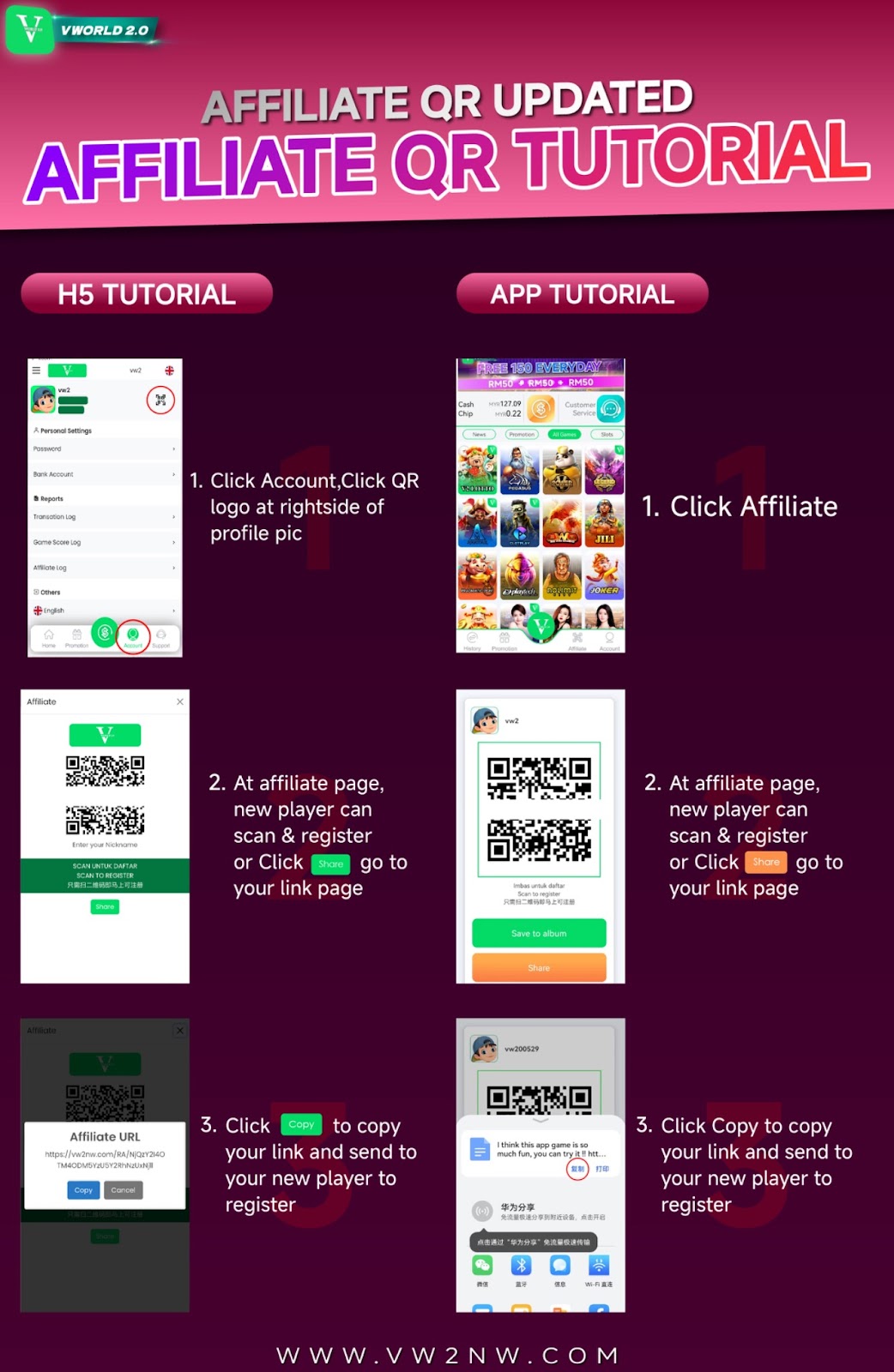
Step 1: Click Account and Find QR Logo
To access the Affiliate QR feature on the H5 (web browser) version of VWORLD2 Download, first log in to your account using your registered mobile number and password. Once logged in, locate and click on the "Account" section, typically found in the main menu or at the top of the page. In the Account section, look at the right side of your profile picture – you will see a QR logo icon. Click on this QR logo to proceed to the affiliate page.
Navigating the H5 Interface
The VWORLD2 Download H5 interface is designed to be user-friendly. The QR logo is prominently displayed near your profile picture for easy access. If you cannot find it immediately, look for any icon that resembles a QR code or the word "Affiliate" in the menu. The account section contains all your personal settings, and the QR feature is integrated here for convenience.
Step 2: Access Affiliate Page – Scan or Share
After clicking the QR logo, you will be directed to the Affiliate Page. On this page, you will see your unique QR code displayed prominently. New players can scan this QR code directly using their mobile device's camera or a QR scanner app to access the VWORLD2 Download registration page. Alternatively, you can click the "Share" button to access your referral link page. The Share option generates a shareable link that you can send through messaging apps, email, or social media.
Understanding Your Affiliate QR Code
Your Affiliate QR code on VWORLD2 Download is unique to your account. When a new player scans this code, the system automatically tracks that they registered through your referral. This ensures that any commissions or bonuses you earn are properly credited to your account. The QR code never expires, so you can use it indefinitely.
Step 3: Click Copy to Copy Your Referral Link
On the Affiliate Page, you will see your referral link displayed, often with a "Copy" button next to it. Click "Copy" to copy your unique referral link to your device's clipboard. You can then paste this link into messages, emails, social media posts, or anywhere you communicate with potential new players. When someone clicks this link and completes registration on VWORLD2 Download, they will be recorded as your referral.
Sharing Your Referral Link Effectively
For best results when sharing your VWORLD2 Download referral link, include a personal message explaining why you enjoy the platform. Share the link with friends who might be interested in SLOT games, LIVE casino, LOTTERY, or SPORTS betting. You can also share the link in appropriate online communities, following their rules about referral sharing. The more people who register using your link, the more potential commissions you can earn.
APP TUTORIAL – Affiliate QR via VWORLD2 Download Mobile App
Step 1: Click Affiliate in the APP
If you use the VWORLD2 Download APP on your mobile device, accessing the Affiliate QR feature is even simpler. Open the APP and log in to your account. Look for the "Affiliate" option in the main menu or navigation bar. This may be labeled as "Affiliate," "Referral," or with a gift/QR icon. Click on "Affiliate" to enter the affiliate section directly.
APP Interface Advantages
The VWORLD2 Download APP offers a more streamlined experience for affiliate functions. The Affiliate option is typically placed in an easily accessible location, and the APP may provide additional features like push notifications when someone registers using your QR code or link. The APP also loads faster and works seamlessly with your device's share functions.
Step 2: Access Affiliate Page – Scan or Share
Once you click Affiliate in the APP, you will be taken to the Affiliate Page. Similar to the H5 version, you will see your unique QR code displayed on this page. New players can scan this QR code directly from your APP screen using their own device. You will also see a "Share" button or option. Clicking Share allows you to send your referral link through various apps installed on your phone, such as WhatsApp, Telegram, Facebook, or SMS.
Using Your QR Code in Person
One advantage of having your QR code in the VWORLD2 Download APP is the ability to show it in person. If you are with friends who are interested in joining, simply open the Affiliate Page in your APP and let them scan your QR code directly from your phone screen. This instant sharing method can be very effective for in-person referrals.
Additional APP Features for Affiliates
The VWORLD2 Download APP may offer additional affiliate features not available in the H5 version. These can include tracking dashboards showing how many people registered through your link, commission earnings, and pending bonuses. Check your APP regularly to monitor your referral success and claim any earnings from your affiliate activities.
Benefits of Using Affiliate QR on VWORLD2 Download
Earn Commissions on Referrals
When new players register using your Affiliate QR code or referral link on VWORLD2 Download, you may be eligible to earn commissions based on their gameplay. Commission structures vary and may include a percentage of the new player's betting turnover, deposit bonuses, or flat rewards for each successful referral. Check the affiliate terms and conditions for detailed information about commission rates and payment schedules.
Easy Sharing Multiple Ways
With both QR code and referral link options available on H5 and APP, VWORLD2 Download makes it easy to share your affiliate information in any situation. Use the QR code for in-person sharing or printable materials. Use the referral link for digital sharing through messages, emails, and social media. Having both options maximizes your ability to reach potential new players.
Track Your Referral Success
Both H5 and APP versions of the Affiliate Page on VWORLD2 Download provide tracking information. You can see how many people have registered through your QR code or link, and in many cases, monitor their activity levels. This helps you understand which sharing methods work best and how your referrals are contributing to your affiliate earnings.
Tips for Maximizing Your VWORLD2 Download Affiliate Success
Share Your QR Code and Link Widely
Don't limit yourself to one sharing method. Use both your QR code and referral link across multiple platforms. Print your QR code and share it in appropriate physical locations (with permission). Share your link in online communities, gaming forums, and with friends who might enjoy VWORLD2 Download. The more places you share, the more potential referrals you can generate.
Explain the Benefits to New Players
When sharing your VWORLD2 Download referral link, take time to explain what makes the platform great. Mention the wide variety of SLOT games, LIVE casino options, SPORTS betting, and LOTTERY games. Highlight promotions like FREE RM50 EVERYDAY on LEGEND, AVATAR, and VPOWER slots. When potential new players understand the value, they are more likely to register through your link.
Follow Up with Referrals
If you personally know people you've referred to VWORLD2 Download, follow up with them after they register. Answer any questions they have about deposits, withdrawals, or gameplay. Helping new players get started not only builds goodwill but also increases the likelihood they will become active players, potentially increasing your affiliate commissions.
Check Affiliate Terms Regularly
Affiliate programs on VWORLD2 Download may have specific terms and conditions, including how commissions are calculated, when they are paid, and what activities qualify. Review these terms regularly to ensure you understand how to maximize your earnings and avoid any actions that might disqualify you from receiving commissions.
Frequently Asked Questions About Affiliate QR on VWORLD2 Download
Is the Affiliate QR feature free to use?
Yes, the Affiliate QR feature on VWORLD2 Download is completely free for all registered players. There is no cost to generate your QR code or referral link, and no fees for sharing them. You only earn rewards when new players register and play.
How do I know if someone registered using my QR code?
VWORLD2 Download provides tracking in your Affiliate Page. You can see the number of registrations from your QR code and referral link. Some versions may show detailed information about your referrals and any commissions earned.
Can I use both H5 and APP for affiliate sharing?
Absolutely. Your affiliate QR code and referral link are the same whether accessed through H5 or APP. You can use both methods interchangeably depending on your situation. The QR code and link are tied to your account, not to the access method.
How long is my QR code valid?
Your Affiliate QR code on VWORLD2 Download does not expire. It remains valid as long as your account is active. You can continue using the same QR code indefinitely to refer new players.
What commissions can I earn from referrals?
Commission structures vary. Check the affiliate terms and conditions on VWORLD2 Download for detailed information about commission rates, calculation methods, and payment schedules. Commissions are typically based on the referred player's betting activity.
Can I share my referral link on social media?
Yes, you can share your VWORLD2 Download referral link on social media platforms, provided you follow the platform's terms of service. Always comply with each platform's rules about promotional content and avoid spammy behavior.
Start Sharing VWORLD2 Download with Affiliate QR Today
Easy Referrals, Great Rewards
With the updated Affiliate QR feature on VWORLD2 Download, sharing your favorite gaming platform with friends and earning rewards has never been easier. Whether you prefer using the H5 web version or the dedicated APP, you have all the tools you need to become a successful affiliate.
Join the VWORLD2 Community Growth
Start using your unique QR code and referral link today. Share VWORLD2 Download with friends, family, and online communities. Every new player you bring adds to the community and potentially to your earnings.
Start Sharing Your QR Code
Log in to VWORLD2 now, access your Affiliate QR code, and start inviting new players to join. Earn rewards while growing the community.